Digital accessibility audits. Evidence, not promises.
Public bodies are answerable for the accessibility of their sites, and an accessibility statement should rest on a real audit. Kaveia audits your site against WCAG (levels A and AA) and EN 301 549, and shows every barrier on a screenshot and in the code. You see the problem, not just a rule number.
See a sample report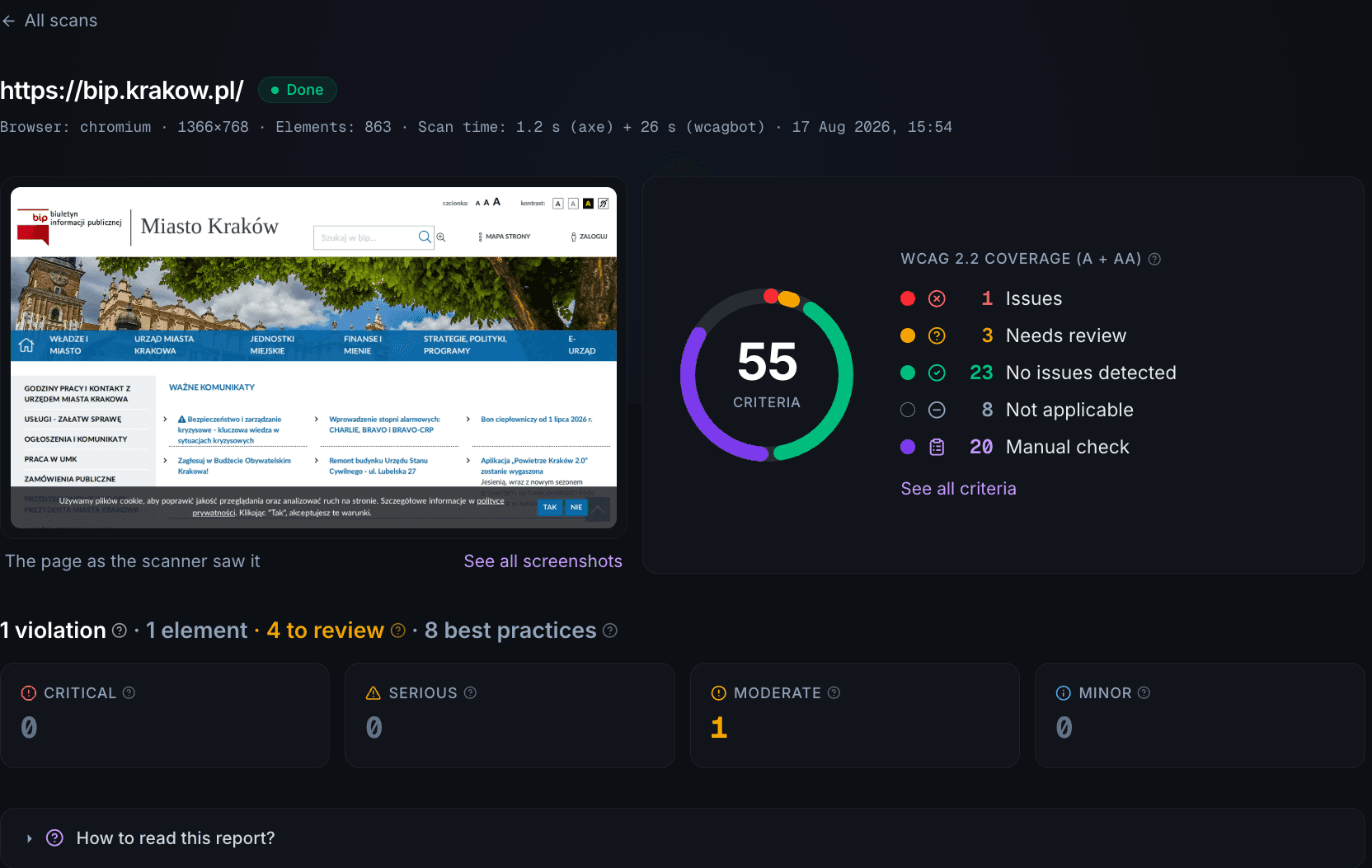
Why now
Digital accessibility is an obligation, not a best practice
Kaveia audits exactly the profile European law asks for: WCAG 2.0, 2.1 and 2.2 (levels A and AA) and EN 301 549.
EU law already requires it
The Web Accessibility Directive obliges public sector bodies across the EU to make their websites and apps accessible, with EN 301 549 as the technical standard. Each member state enforces it through its own transposing act. In Poland that is the ustawa o dostępności cyfrowej.
The European Accessibility Act widened the net
The EAA extends accessibility duties beyond the public sector to a broad range of products and services offered to consumers, including e-commerce, banking and transport. Many private companies are now in scope for the first time.
Any user can report a barrier
Someone who meets a barrier can request that it be fixed and, if the body does not respond in time, escalate a complaint. Ignoring it is not neutral: national law provides for financial penalties.
Monitoring is periodic and public
Member states monitor public sector sites on a cycle and publish the results. The model pairs simplified monitoring, automated and across a large sample, with in-depth expert audits.
The bar is about to rise
The new version of EN 301 549, aligned with WCAG 2.2, is expected to be harmonised around October 2026. Kaveia audits WCAG 2.2 criteria today, so a report you run now does not go stale when the standard changes.
Kaveia fits the monitoring model
The official model pairs automated breadth with expert judgment. That is exactly the combination Kaveia delivers: automated checks across many pages, plus evidence prepared for a human to judge.
This summary is informational and is not legal advice. The exact duties depend on the type of organization and the member state.
How it works
From a URL to a report with evidence
- 01
Submit a URL
Enter the address of a page or a whole site. No code changes and nothing to install.
- 02
A real browser examines the page
Chromium loads the page and runs the full battery: rules, interaction probes and the labeled AI auditor.
- 03
You get a saved report
Findings sorted by impact on users, evidence attached to each one, and a coverage view of all 55 criteria.
- 04
You fix, then check again
Once the fixes ship, run the audit again and see what actually disappeared. Audits can repeat on a schedule, so you see accessibility over time, not just on the day of the audit.
What happens to the report
Findings go straight into your team's or your agency's backlog: each one carries a screenshot, an element crop and the code it concerns. Kaveia does not fix the code for you. Kaveia checks whether the fix worked.
What automation can and cannot do
35 of 55 criteria checked automatically. All 55 get an answer.
No tool can make a site compliant with one click. Kaveia states plainly what it checked automatically, what needs a human, and why.
Automation does the heavy lifting
About 35 of the 55 WCAG 2.2 criteria (levels A and AA) carry an automated signal on every page, and 39 of 55 in whole-site audit mode. The remaining criteria are clearly marked for human review.
Every criterion gets an answer
The report shows all 55 criteria and gives each one of five statuses: issues found, no issues detected, not applicable to this page, needs review, or manual assessment. The last two mean different things: needs review means automation caught something but cannot decide it, while manual assessment means the criterion cannot be checked automatically at all. Always with the reason for that status.
AI findings are always labeled
Nine criteria are judged by an AI auditor. Every such finding carries a visible label and its reasoning, prepared for human review. In the report they are easy to tell apart from rule-based results.
No score badges
We do not show grades like 85 out of 100. Automation catches only part of real barriers, so a number like that would give false confidence. We count coverage, we do not hand out grades.
Evidence
Evidence, not just verdicts
Every finding can be seen, understood and shown to others.
Full-page screenshots
Every audited page comes with a full screenshot as context for the findings.
Element crops
Each finding points at a specific element, with its crop from the screen.
Code snippets
Findings show the code they concern, ready to hand to your team.
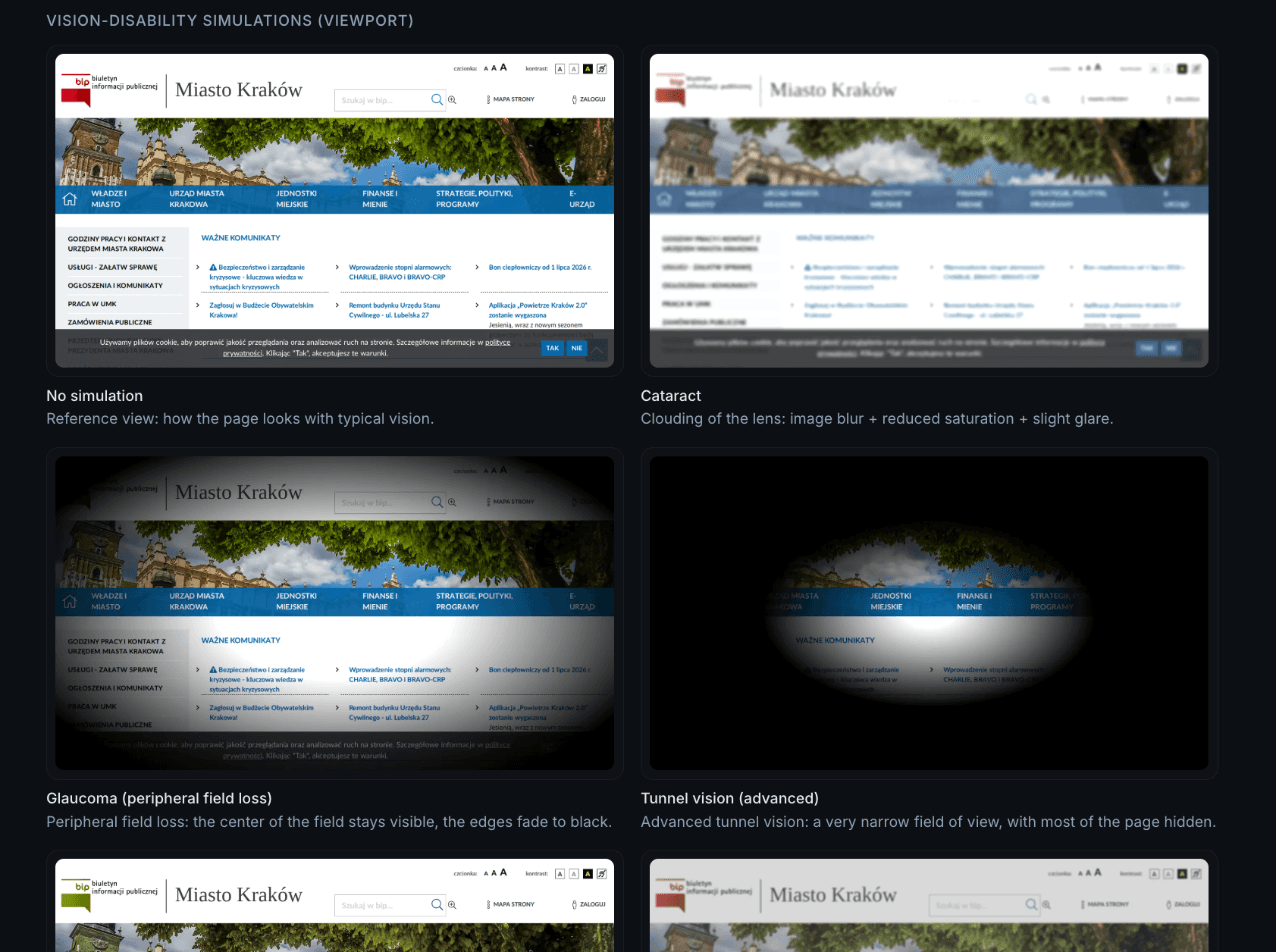
Vision simulations
Five simulations per page show how the content looks to people with visual impairments, including colour vision deficiency.
Reports in two languages
Every saved report is readable in Polish and English, including older reports.
- See a sample report
What gets checked
What exactly gets checked
Four layers of checks, from static rules to whole-site behavior. All of it in a real browser, not inferred from code alone.
- 01
Rules engine
92 axe-core rules running in a real Chromium browser, on the page exactly as a user sees it.
- 02
Interaction probes
Tab walks, focus visibility, reflow at 320 px, text spacing, autoplay and motion, widgets that appear on hover. Plus event forensics: keyboard shortcuts, pointer gestures, pointer cancellation and dragging movements.
- 03
AI auditor, always labeled
Nine criteria no deterministic rule can decide, including alt-text faithfulness, page titles, link purpose, heading descriptiveness and error identification. Every finding carries an AI label and visible reasoning.
- 04
Whole-site checks
Criteria invisible on a single page: consistent navigation, multiple ways to reach content, consistent identification and consistent help.
We check what no other automated tool checks
Dragging movements, pointer gestures, pointer cancellation, keyboard shortcuts and consistency across pages. These are barriers users actually hit, and other scanners leave them to manual review. In the language of the standard: 2.5.7, 2.5.1, 2.5.2, 2.1.4 and 3.2.3, 3.2.4, 3.2.6. Based on our market review of August 2026.
Scale
Whole sites, not single pages
An accessibility statement covers a site, not a homepage. Kaveia audits the site as a whole.
WCAG-EM sampling
For a site audit, Kaveia selects a representative sample of pages following the WCAG-EM methodology and recognizes repeated templates.
Cross-page findings
The site report contains findings about the consistency of the whole site, with per-page reports collected in one place.
Recurring audits
Audits can be scheduled to repeat regularly. You see accessibility over time, not just on the day of the audit.
Audit modes
| Mode | What runs | Time |
|---|---|---|
| Quick | rules engine | seconds |
| Standard | rules, interaction probes and analyzers | 1–2 minutes |
| Audit | rules, interaction probes and the labeled AI auditor on every page | a few minutes |
| Site audit | full site crawl and cross-page checks | minutes |
Pricing depends on the number of sites, the number of pages and the audit mode. Tell us your scope and we will put together a matching quote.
For agencies and parent organizations
One dashboard, many entities
If you answer for the accessibility of more than one site, Kaveia is built for exactly that.
A separate space per client
Each entity gets its own space and its own reports. An agency team works across all of them from one account, without mixing client data.
The whole portfolio in one view
The accessibility state of every entity you look after sits in one dashboard, so you see where things are slipping before a user reports it.
Recurring audits across the portfolio
Audits can be scheduled to repeat for every site you manage. Each cycle produces a report that is ready to hand to the client.
A parent body over its units
The same model works inside public administration: a city hall can oversee its units, schools and municipal companies, and each one keeps its own reports.
Questions and answers
Frequently asked questions
- How much does it cost?
- Pricing depends on the number of sites, the number of pages and the audit mode, so we prepare it per client. Tell us your scope and we will send a quote. The service is invoiced by CetusPro sp. z o.o.
- How do I start?
- There is no public self-signup, because we run every onboarding personally. Write to kontakt@kaveia.com: we create an account for you and your team, and we walk through the first report together.
- Does Kaveia fix the problems it finds?
- It does not change your code, but it does tell you what to change. A finding carries a screenshot, the element in question, the code it concerns and a suggested fix, so the task goes straight into your team's work. Your team or your agency makes the change, and once the fixes ship you run the audit again to see what actually disappeared.
- Is the report enough for an accessibility statement?
- The report gives you the material to base a statement on: what was audited, what was found and what needs human judgment. The statement itself remains the organization's own document, and the organization stays responsible for its content.
- Do we have to install anything or change our code?
- No. There is no plugin to install and no code to change. Kaveia opens your site in a real browser, the way a user would. Nothing is injected into the site, so an audit needs no deployment work from your team.
- Can you audit pages behind a login?
- Yes. Beyond publicly reachable pages, we can also cover areas behind a login. Write to us and we will agree the scope and how access will work.
- Do you sign a data processing agreement?
- Yes. Where an audit means processing personal data on behalf of the organization, we enter into a data processing agreement. Our privacy policy and terms describe how processing works.
- Where is the data processed?
- In the European Union. Hosting is in Amsterdam, and files, including screenshots, live in storage under EU jurisdiction.
- Is Kaveia an overlay?
- No. Kaveia adds nothing to your site and promises no one-click fixes. It is an audit tool: it finds barriers and documents them with evidence, so your team can fix them at the source.
- Will Kaveia make my site compliant?
- No tool can guarantee that. Kaveia audits your site against WCAG and EN 301 549, shows what it found, what automation cannot decide, and what needs a human. It supports compliance work, it does not guarantee compliance.
- How does AI work in the reports?
- The AI auditor judges nine criteria that deterministic rules cannot cover. Every such finding is clearly labeled as coming from AI, shows its reasoning, and is prepared for human review.
- Who is behind Kaveia?
- The service is provided by CetusPro sp. z o.o., based in Rzeszów, Poland, registered in the Polish court register under KRS 0000877163. Kaveia is the name of the service; the company is the contracting party.
See how your sitedoes today.
Request a first audit. We run it with you and walk through the report step by step, so the results can go straight into your team's work.